When I first started exploring how AI models connect with external tools and data, I realized how complicated it can get. Each integration felt like reinventing the wheel. Then I came across Model Context Protocol servers, often called MCP servers, and everything started to make more sense.
In this post, I want to break down what Model Context Protocol servers are, how they work, why they matter for AI systems, and what I’ve learned while digging deeper into them.
What are Model Context Protocol servers
Model Context Protocol servers are part of an open standard designed to help AI models talk to external systems. Imagine your language model being able to pull data from your files, connect to APIs, or even run a function safely without exposing sensitive systems. That is what MCP makes possible.
Before this standard existed, every developer had to write custom code for each tool or data source. It was messy and hard to maintain. With MCP, the idea is simple: one protocol that connects many tools and services to AI models in a consistent way.
According to the official documentation, MCP defines a common language between the AI client (for example, a chat model) and servers that provide data, tools, or prompts. This gives developers a clear structure for building smarter assistants.
Documentation: https://modelcontextprotocol.io/docs/getting-started/intro
How MCP servers actually work
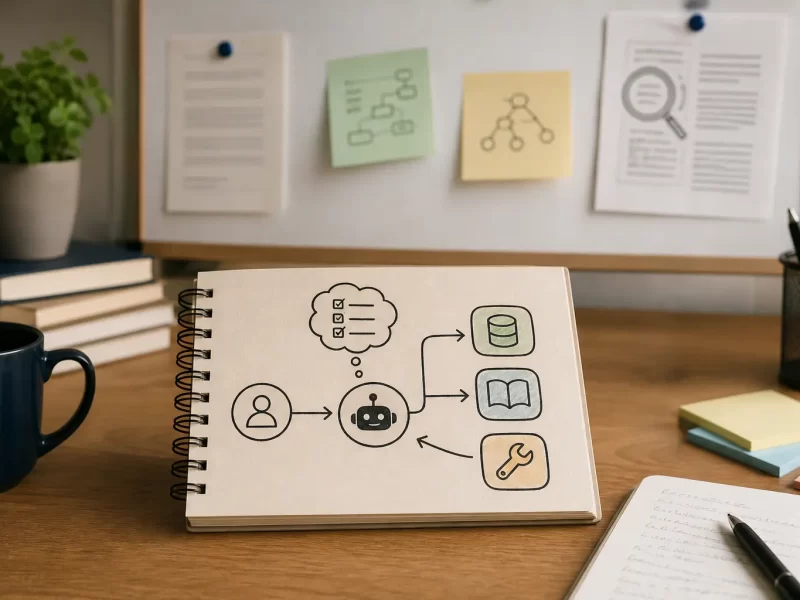
The setup follows a client and server model. The AI app is the client, and the Model Context Protocol servers provide access to tools, resources, or prompts that the client can use.
Each server can expose three main capabilities:
- Resources – structured data such as files, database rows, or documents.
- Tools – actions that the AI model can perform, such as running a search or sending a message.
- Prompts – reusable instruction templates that help the model perform tasks more accurately.
So when the AI model needs information, it sends a request to an MCP server. The server responds with what the model needs, and that new context helps generate a smarter and more useful answer.
This setup means the model can work with live data rather than just relying on its training knowledge.
(Model Context Protocol specification)
Why Model Context Protocol servers matter
If you think about it, most AI models are limited by the data they were trained on. They cannot see your files, connect to databases, or use external APIs by default. MCP changes that by giving them a safe and structured way to access those systems.
Some real-world uses include:
- Letting an AI assistant read or summarize your local files.
- Allowing enterprise AI systems to pull data from internal databases.
- Coordinating multiple tools, like calendars and CRMs, in a single AI workflow.
This standardization helps developers avoid one-off integrations and build tools that can work across multiple platforms.
(GitHub MCP servers)
Building and running an MCP server
If you are thinking about experimenting, you can either use existing Model Context Protocol servers or create your own.
When you build a server, you need to:
- Define what tools, resources, or prompts it will expose.
- Follow the MCP specification for handling requests and responses.
- Manage sessions and concurrency if you expect multiple clients.
- Include metadata that describes your server’s capabilities.
There are SDKs in Python, Java, and TypeScript that make this easier. You can find them on the official GitHub repository.
When your server is ready, you can connect it to an AI client such as an assistant or model runner. The client will automatically discover your server, understand its tools, and start sending requests.
Strengths and weaknesses
Strengths
- It standardizes how AI connects to external systems.
- It is flexible and supports many kinds of data or tools.
- It is open source and extendable.
- It allows AI models to use live, real-world context instead of static data.
Weaknesses
- Performance may become an issue when multiple servers or large datasets are involved.
- Security is critical, since AI models gain access to potentially sensitive data.
- Managing many servers and keeping them updated can be challenging for larger setups.
Despite these challenges, I think the benefits are worth it. The structure and flexibility MCP provides far outweigh the complexity of building custom integrations.
Security and governance
Whenever an AI model gets access to tools, security should be your top concern. Researchers have pointed out risks in Model Context Protocol servers, such as prompt injection and tool misuse.
(arXiv study on MCP security)
Some ways to reduce risk include:
- Defining strict permission rules for each tool and data source.
- Logging every server request for auditing.
- Limiting high-risk actions and requiring user approval for sensitive ones.
- Keeping software versions consistent across servers.
The goal is to let AI models do useful things without crossing into unsafe territory.
The future of Model Context Protocol servers
From what I have seen, MCP is quickly becoming part of the broader AI ecosystem. New servers are appearing for everything from file systems to cloud tools. There is even a registry where developers can share and discover new servers.
(mcplist.ai)
I expect we will see deeper integration with operating systems and productivity apps, and maybe even built-in MCP support in future AI platforms. As adoption grows, the focus will likely shift to governance, discovery tools, and best practices for building secure servers.
Summary
Model Context Protocol servers are a big step forward for AI systems. They make it possible for models to access tools, data, and workflows in a safe and standardized way. This means richer responses, more useful automation, and a simpler developer experience.
There are still challenges around security and scale, but as the ecosystem matures, these will become easier to handle. For developers and AI enthusiasts, this is a space worth watching closely.
You can find more of my thoughts on AI topics on my AI & Machine Learning category, read more posts on my blog, or learn more about me on my about page.